The core app is free forever

The cleanest way
to split expenses.

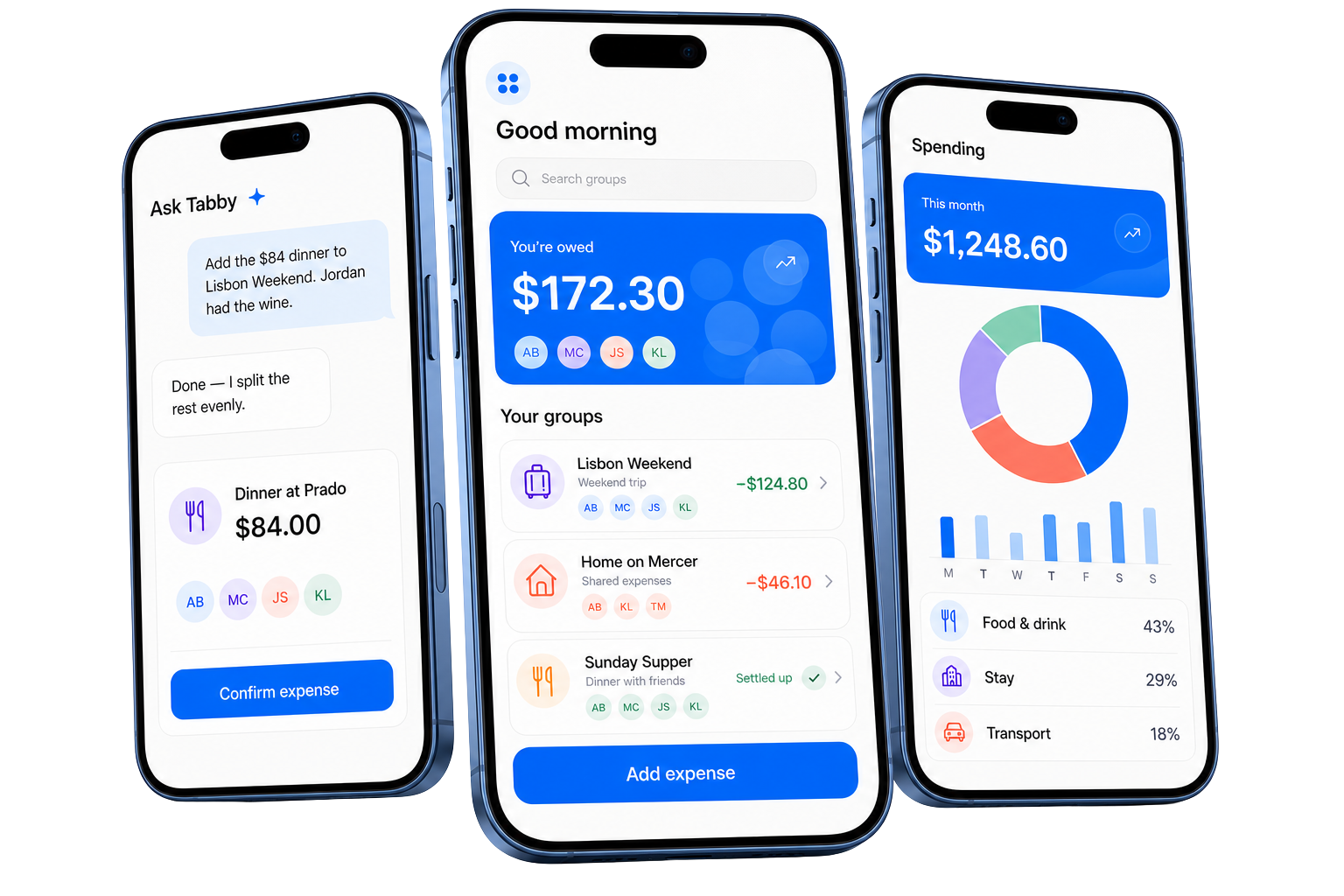
Tabby tracks who paid, splits the cost, and shows exactly who owes what. Free, no ads.

See how it works
Three Tabby app screens showing the assistant, group balances, and spending insights

Trips, roommates, dinners

Every shared expense, tracked in one place.

Use it with one roommate or a group of twelve. Add expenses as they happen and Tabby keeps the totals straight.

Group trips
Roommates & rent
Dinners out
Couples
Road trips
Game nights
Office lunches
Family plans

Splitting

Split any expense, any way.

Split equally, by exact amounts, percentages, shares, or item by item. Works for a quick coffee or a two-week trip.

Every split, built in

Add an expense in seconds.

Pick the people, choose how it splits, and Tabby handles the math.

Weekend groceries

$186.40

AB MC JS KL
Equal Exact Percent Shares Itemized

Paid by

You · $186.40

Split equally

$46.60 each

Guests

Nobody is forced to install the app.

Add anyone to a group by name. They can claim their spot with a link later, or never. Their share stays tracked either way.

  • M Maya Member
  • S Cousin Sam Guest
Invite to claim ↗

Itemized when you need it

Split the check line by line.

Dinner at Prado

$148.20

4 people
  • PastaMaya · $22
  • PizzaDan · $18
  • WineShared · $44
  • Tax & tipSplit fairly

Pending payments

Deposits and holds don't mess up balances.

Log hotel holds and deposits as pending. They stay out of everyone's balance until you confirm the final charge.

Hotel incidentals hold

$200.00

pending

Not counted in balances

Confirm expense

Spending charts

See where the money goes.

Totals by category, member, and month, for any group or friend.

Lisbon Weekend · March

  • Food$412
  • Stays$265
  • Transport$148

Balances

Always know who owes what.

Balances update instantly. Tabby simplifies who pays whom, and payment reminders are one tap away.

How it works

01

Add

Log the expense: who paid, who is in, and how it splits.

02

Track

Every balance updates the moment a new expense lands.

03

Simplify

Tabby combines debts so fewer payments settle the group.

04

Settle

Record the payment, or send a reminder with one tap.

Lisbon Weekend

$172.30

you are owed

  • M Maya owes you $74.80
  • D Dan owes you $109.70
  • S You owe Sam $12.20
Settle up

Debt simplification

6 payments become 2

Optional with Tabby Pro

Scan the receipt, split every line.

Take a photo and Tabby pulls out the items, tax, and tip. Assign what everyone had, then confirm the split.

Scanned receipt

Trattoria da Enzo

12 items
  • Cacio e pepe

    $19.00

    Maya
  • Margherita

    $16.50

    Dan
  • Tiramisu ×2

    $14.00

    Shared
  • Tip & tax

    $11.20

    Split
Confirm split
Tabby Assistant

Add expenses in plain words.

Type the expense the way you would say it and Tabby fills in the split. You can also ask it about balances and who owes what.

You confirm every change

Add the $84 dinner to Lisbon Weekend. Jordan had the wine.
Added. Wine is on Jordan, the rest is split evenly.
Who still owes me?
Maya and Dan, $98.30 total.

Getting started

Switch from Splitwise without losing anything.

Import your Splitwise data, invite your group with a link, and keep adding expenses even without a connection.

Import from Splitwise

Your groups and balances carry over.

Import them from Splitwise and pick up where you left off. No starting over.

S

Splitwise archive

3 groups · 218 expenses

Ready in Tabby

Everything matched ✓

Lisbon Weekend

42 expenses

Home on Mercer

138 expenses

Sunday Supper

38 expenses

Invite anyone

Share one link to add the whole group.

Invite to Lisbon Weekend

tabbyai.app/join/lisbon Copy
ABMCJS+1

Works offline

No signal? Keep splitting.

Add expenses without a connection. Tabby syncs them when you are back online.

Expense saved

Waiting to sync

Pricing

Free forever. No ads.

Splitting, balances, and settling up cost nothing. No limits, no paywalled basics. Pro only adds the AI features.

Tabby core

$0 forever

Everything you need to split expenses, free for everyone.

Everything included

  • Unlimited expenses, groups, and friends
  • Equal, exact, percentage, shares, and itemized splits
  • Balances, reminders, and settle up
  • Debt simplification
  • Multi-currency and recurring expenses
  • Spending charts
  • Offline support

Tabby Pro is only for the AI

Receipt scanning and the Tabby Assistant are optional. The core app remains free whether you subscribe or not.

Download

Try it on your next group expense.

Download the app, add your group, and log the first expense. Setup takes about a minute.

Not sure yet? See the features

FAQ

Common questions

Is Tabby really free?

Yes. Expenses, groups, balances, reminders, debt simplification, and settle-up stay free with no ads or daily limits. Tabby Pro is only for optional AI features.

Do my friends need the app?

No. Add anyone to a group as a guest by name and their share is tracked like everyone else. If they install Tabby later, they claim their spot with a link and take over their own balance.

How can I split an expense?

Split equally, enter exact amounts, use percentages or shares, or assign individual receipt items. Tabby does the math for each person.

Can I move over from Splitwise?

Yes. Import your existing groups and balances from Splitwise and keep going where you left off.

Does Tabby work without a connection?

Yes. You can keep adding expenses offline, and Tabby syncs your updates when you are connected again.

What does Tabby Pro add?

Tabby Pro adds AI receipt scanning and the plain-language Tabby Assistant. You confirm every proposed change before it affects a group.

Get Tabby

Get the app.

The core app is free. No ads, no daily limits.

For Android Google Play Download now

The iPhone App Store listing is still being prepared.